> ## Documentation Index
> Fetch the complete documentation index at: https://docs.cfosilvia.com/llms.txt
> Use this file to discover all available pages before exploring further.
# Goals
> Set financial goals and track progress toward them.
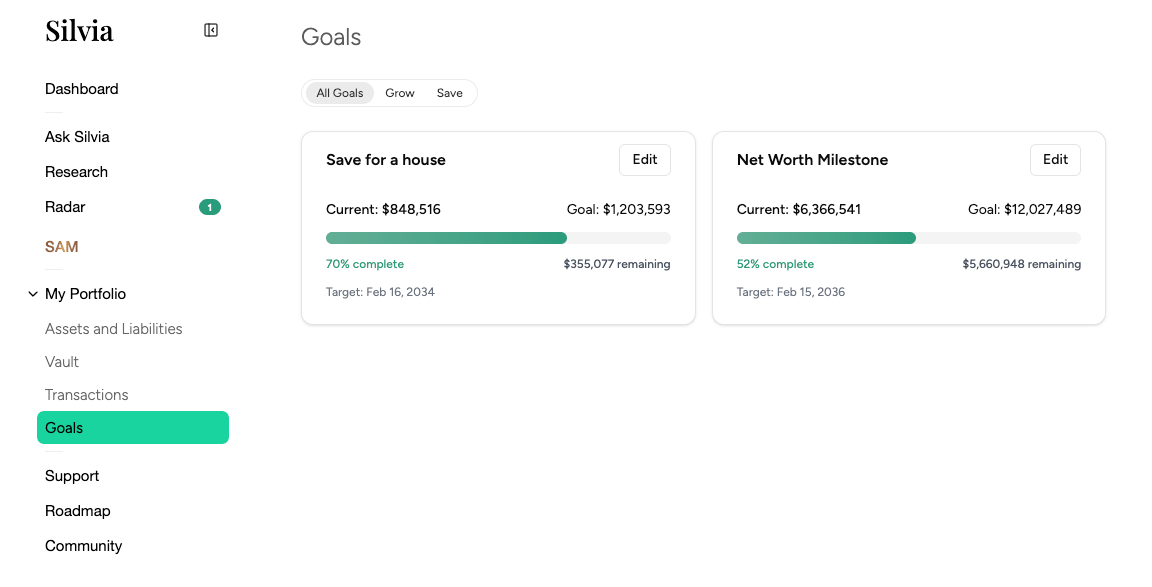
**Goals** let you define what you're working toward and see how you're tracking.
 ## Types of goals
* **Savings targets** (e.g. "\$50k emergency fund")
* **Debt payoff** (e.g. "pay off credit card by December")
* **Retirement** (e.g. "\$2M by age 65")
* **Big purchases** (e.g. "home down payment")
* **Custom**
## Creating a goal
From the Goals page, click **New goal**.
Set the target amount, target date, and which accounts to track against the goal.
Silvia calculates progress automatically from your connected accounts.
## Tracking progress
Each goal card shows:
* Percent complete
* Amount contributed vs. remaining
* Projected completion date based on current pace
* Suggested monthly contribution to hit the target
## Goals in Ask Silvia
Ask questions like:
* "How much more do I need to save each month for my house goal?"
* "If I put my tax refund into my emergency fund, when will it be complete?"
This documentation is built and hosted on [Mintlify](https://mintlify.com), a developer documentation platform.
## Types of goals
* **Savings targets** (e.g. "\$50k emergency fund")
* **Debt payoff** (e.g. "pay off credit card by December")
* **Retirement** (e.g. "\$2M by age 65")
* **Big purchases** (e.g. "home down payment")
* **Custom**
## Creating a goal
From the Goals page, click **New goal**.
Set the target amount, target date, and which accounts to track against the goal.
Silvia calculates progress automatically from your connected accounts.
## Tracking progress
Each goal card shows:
* Percent complete
* Amount contributed vs. remaining
* Projected completion date based on current pace
* Suggested monthly contribution to hit the target
## Goals in Ask Silvia
Ask questions like:
* "How much more do I need to save each month for my house goal?"
* "If I put my tax refund into my emergency fund, when will it be complete?"
This documentation is built and hosted on [Mintlify](https://mintlify.com), a developer documentation platform.